As a GST-registered business person or transporter in India, you may have come across the E-Way Bill system. However, do you know how to use it correctly? Knowing the Eway Bill Login process is the initial step towards remaining compliant, avoiding penalties, and ensuring seamless transportation of goods across states.
Here’s what you need to know, from sign-up to logging in, to the features and what to do if you get stuck.
E-Way Bill Portal Definition
E-Way Bill (EWB) is an electronic waybill that has to be generated when a consignment of goods worth more than ₹50,000 is being transported in a single invoice, bill or delivery challan. ewaybillgst.gov.in is the official government website for generating, e-writing, managing and canceling EWBs by National Informatics Centre (NIC).
A second synchronized portal ewaybill2.gst.gov.in also has been launched as of July 1, 2025. Both portals are real-time synced, meaning that there is minimal downtime, and businesses can access the material during their peak hours or maintenance time.
Who Can Access the E-Way Bill Portal?
There are three types of users that can access the portal:
- GST-registered taxpayers (businesses and individuals registered under GST)
- Registered transporters means logistics companies, transport companies having GSTIN.
- Unregistered transporters and citizens who can register on the portal to be provided with a unique Transporter ID or a login ID to generate EWBs
How to Register on the E-Way Bill Portal
To log in, you must register at one time only. Here is how:
- Visit ewaybillgst.gov.in
- Click on Registration then select E-Way Bill Registration
- Fill GSTIN and Captcha code and click on Go.
- The GST Common Portal will auto-populate your business information
- Check the information and create OTP on your registered cell phone number
- Confirm the OTP and then create your username and password
- Click Submit to register
Note: Use the “Update from GST Common Portal” option before you click any further if any information is auto-filled incorrectly.
Read Also: Bestautoxperts Cars: A Trusted Platform for Car Lovers and Buyers
Step-by-Step Eway Bill Login Process
After registering, you can log in following these steps:
- Open the browser and visit the ewaybillgst.gov.in website.
- On the top right corner click the Login button
- Enter your Username, Password, and the Captcha Number shown.
- Click Login
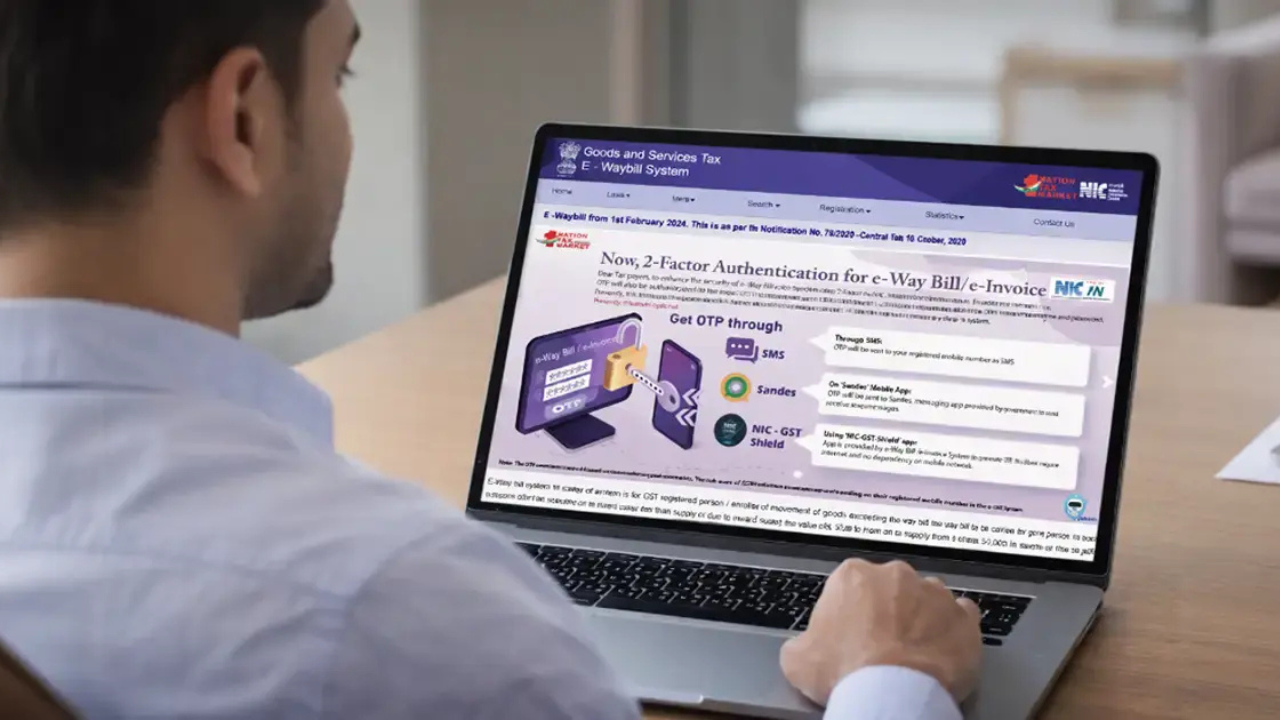
Important: From April 1st 2025, Two-Factor Authentication (2FA) is required for all users, irrespective of turnover. Once you log in with your credentials, you will receive an One-Time Password (OTP) on your registered mobile number via SMS, Sandes application or NIC-GST-Shield application. Once you enter the OTP, you’ll be able to log in.
Once you log in successfully, you will be able to view your GSTIN, key transaction details and other buttons to process EWBs.
Key Features Available After Login
When you have entered the portal you have access to a wide array of advanced functions:
- Generate New E-Way Bill: Generate a new EWB with the provision of filling details of the invoice and transport.
- Update Vehicle Number: Edit information for an existing EWB for changes in transport
- Cancel E-Way Bill: Cancel an EWB if goods are not transported.
- Consolidated E-Way Bill: Combine multiple EWBs into one for a single consignment
- Bulk Generation: Upload and create multiple EWBs at once.
- Track Transactions: Keep an eye on all created and active EWBs on your dashboard
Final Word
Under the umbrella of GST compliance, the E-Way Bill system is a pivotal component, and navigating the Eway Bill Login process is crucial for businesses transacting goods across India. From registration to login, usage of features and troubleshooting common errors, this guide provides the tools you need to make smooth and penalty-free transportation a reality every time. Always use the official portal of ewaybillgst.gov.in for a secure and smooth experience, keep your credentials secure, and enable 2FA.
FAQs
1. What is ‘EWay Bill Login’ and why is it necessary?
Eway Bill Login is a login that opens the official government E-Way Bill portal. It enables the registered taxpayers and transporters to create, update and cancel an E-Way Bill.
2. Is there any need to register separately on E-Way Bill portal if I have registered on GST portal?
Yes. The registration for GST is different from E-Way Bill registration. All the GST-registered person will have to register a username and password on the e-Way Bill portal with his/her GSTIN for using the portal for every purpose.
3. How many incorrect logon attempts will be permitted before my account is disabled?
The portal will lock your account for 5 minutes if your username and/or password are incorrect 3 times in succession. Then you can attempt to log back in again or click “Forgot Password”.
4. Is there any provision to access the E-Way bill portal on the mobile phone?
Yes. The portal is 100% mobile responsive and can be accessed via any mobile browser. There is an Android official app as well, for easy access on the go.
5. What if I am able to log in to the GST portal and not to the E-Way Bill portal?
This usually happens if your GST registration has been deactivated or suspended. Check your GSTIN status on the GST Common Portal (gst.gov.in).